MAKE A LIVING
Businesses, restaurants & nightlife
On this page
The official description lets you grow a business and manage restaurants and nightclubs. Build your plan around the venue you actually own, rather than an assumed universal best strategy.
Stocking Ramen Noir: tested on Days 8 and 9
In one saved game on Steam Build 25738165, tested October 7, 2026 UTC, we bought supplies, filled Ramen Noir’s storage and observed its first day of sales. We used the Simplified Chinese interface; English control and objective names below are our translations. See the test scope.
1. Check the shopping list and buy the missing ingredients
Pressing L opened the quest shopping list. It distinguished carried ingredients from the amount held by the shop. In this run, we needed eight ramen noodle units, ten onions and eight additional chicken units; two chicken units were already in the personal inventory.
The farmer supplied onions and chicken. A fruit-and-vegetable trader supplied the ramen noodles. The noodle entry at the baker was unavailable in this test. Selecting the available noodle entry in the shopping list scrolled to that ingredient in the trader’s stock.
| Day 8 purchase | Quantity | Cash paid |
|---|---|---|
| Onions from the farmer | 10 | 17.80 |
| Chicken from the farmer | 8 | 29.44 |
| Ramen noodles from the produce trader | 8 | 15.92 |
These purchases cost 63.16 in total. Only the chicken offer displayed a −41% daily trade modifier; the other two displayed no daily adjustment. Prices and existing stock are examples from this run, so use your own list and quoted total.
2. Move the ingredients into restaurant storage
- At Ramen Noir, enter the kitchen through the gap beside the counter. Approach the tall refrigerator with blue illuminated edges until Open appears.
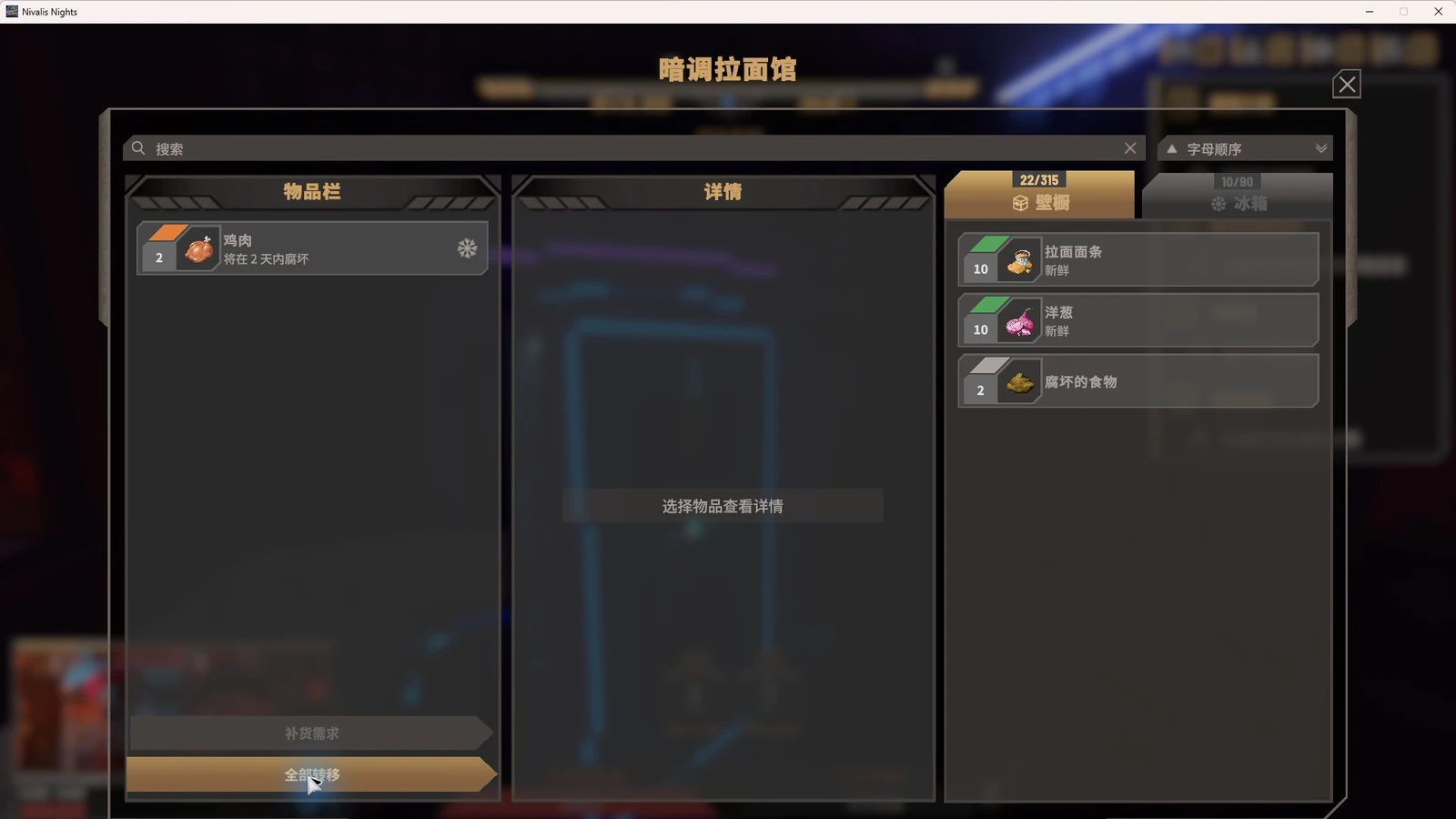
- Press E to open the venue-storage interface. Buying ingredients had placed them in the personal inventory; the shop still needed them.
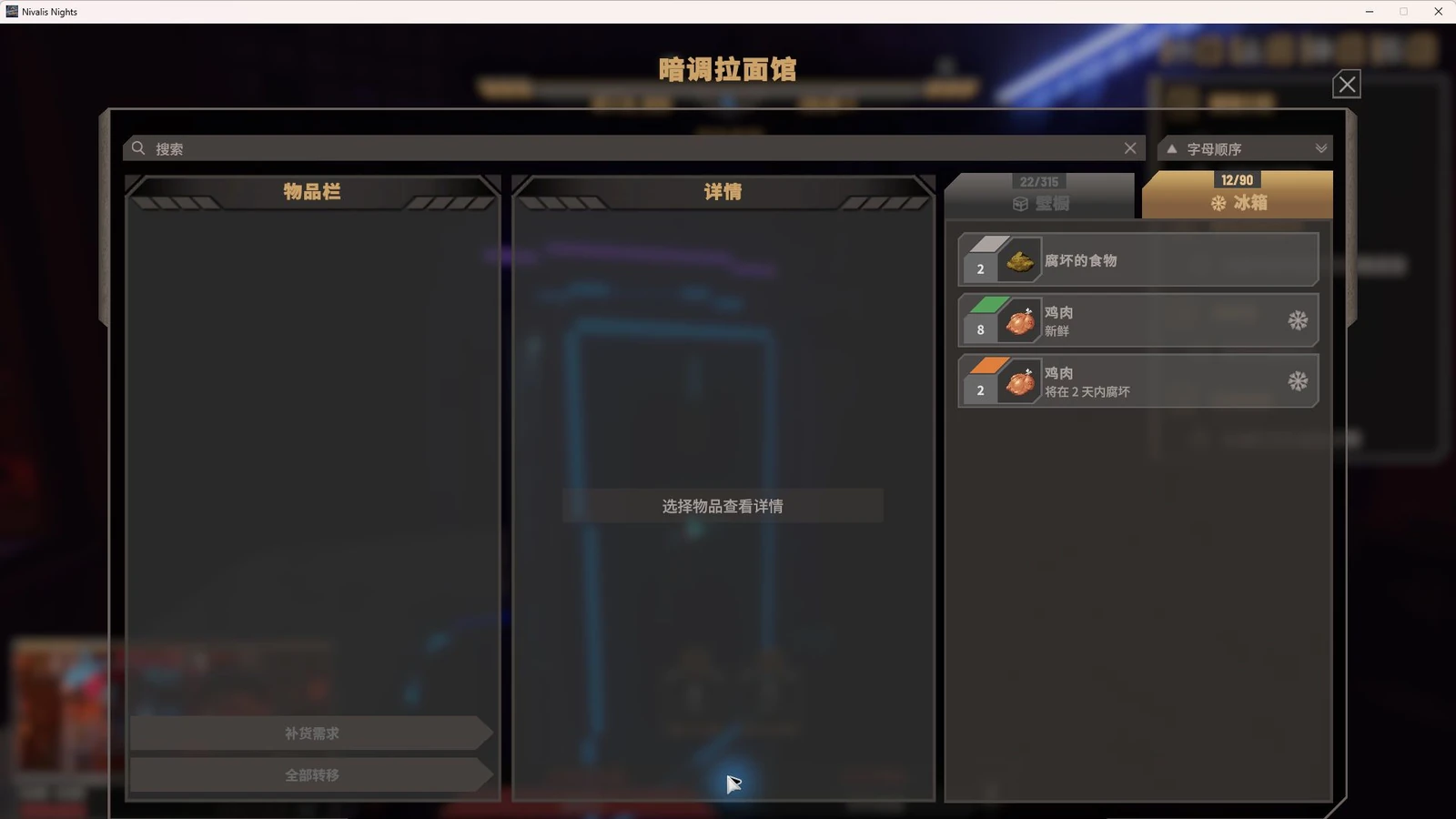
- Choose Transfer all. In our test, this moved the purchased noodles, onions and fresh chicken into venue storage, but left the separate two-unit chicken batch in the personal inventory.
- Inspect the remaining personal inventory. We selected that chicken batch and chose Transfer to container to move it too.
- Close storage and check the quest. Fill shop inventory was now complete. Return to Banor remained the next objective.
Check the result rather than assuming every batch moved. We did not establish why that chicken batch remained after the first transfer, or a universal storage-capacity rule.
3. Check the first sales and ingredient warnings
On Day 9, the First customer achievement appeared while our character was in the apartment. Later, Ramen Noir’s management screen showed 8/10 meals toward its first ten-meal counter and 168.00 in income. Its Chicken Ramen price was 21.00.
The restaurant then held two noodle units and two onions, with no chicken listed. The menu’s chicken requirement was red and a restocking objective was visible. Check the venue inventory and recipe requirements when this happens; ingredients carried by the player are a separate inventory.
4. Read the two financial screens separately
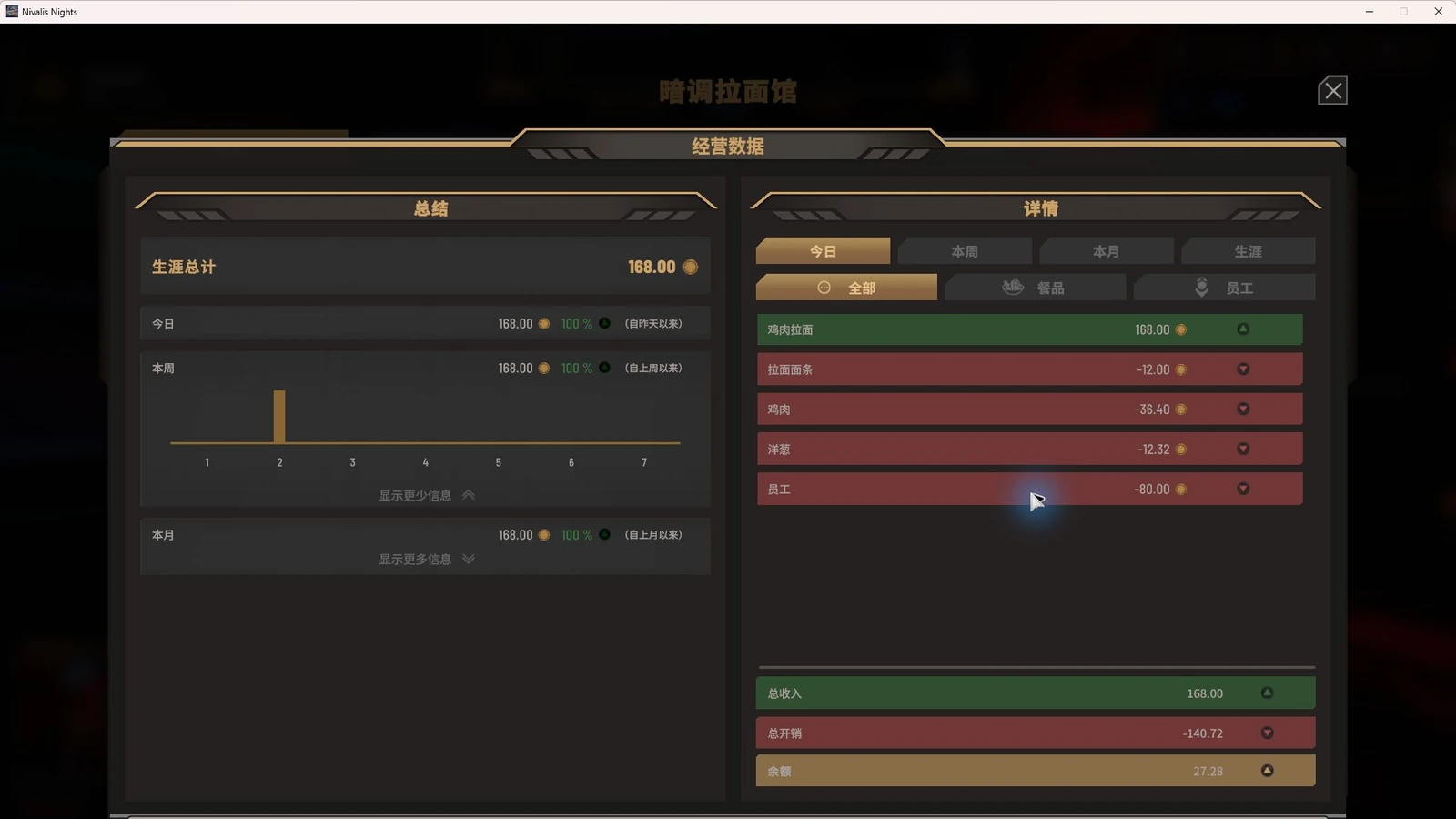
The management ledger displayed income 168.00, ingredient costs 60.72, employee costs 80.00, total expenses 140.72 and a balance of 27.28. Its ingredient costs differed from the previous day’s actual vendor payments.
The separate Day 9 end-of-day screen displayed sales 168.00, overhead 80.00 and a venue result of +88.00. It listed 60.00 under Purchases and 10.00 for the apartment, producing a displayed daily result of +18.00. A separate security call earlier that day had charged a 60.00 fine. A debt payment followed the end-of-day screen.
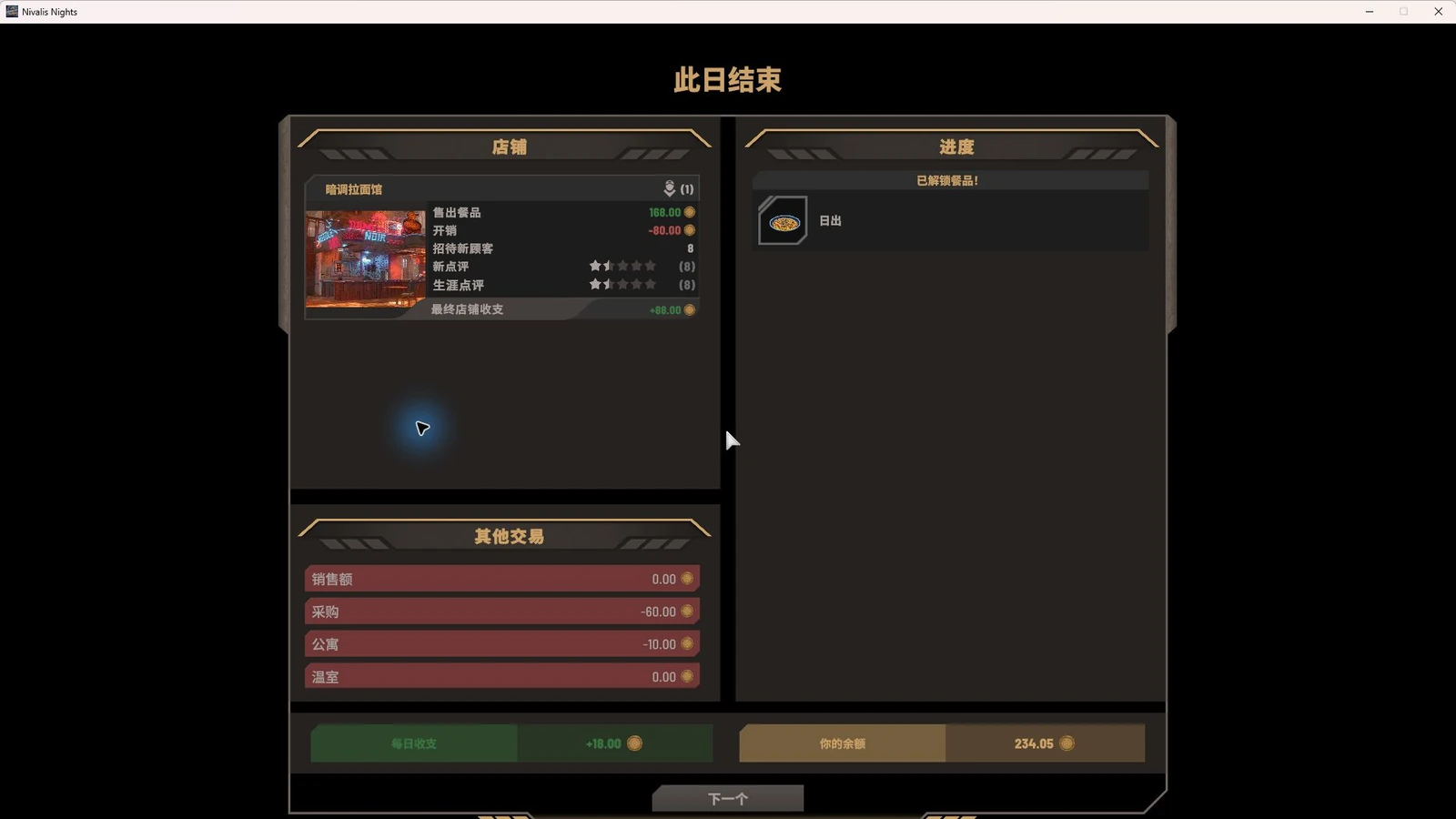
Try each screen separately in the worked budget examples. These observations do not establish the game’s underlying accounting rules.
These are distinct displays from one run. We have not established their underlying accounting rules, a repeatable daily return, an ingredient-consumption formula or an optimal menu. A new Day 9 manual-save entry was visible afterward; Return to Banor was still pending, and we have not reloaded that new entry.
Hiring a cleaner and checking new recipes: tested on Days 11–13
This continues our first restaurant supply run. We continued one saved game on October 8, 2026 UTC, using the Simplified Chinese interface. The game build number was not re-recorded during this follow-up. English control and dialogue labels are our translations. See the evidence and limits.
Open the business screen and check your staff capacity
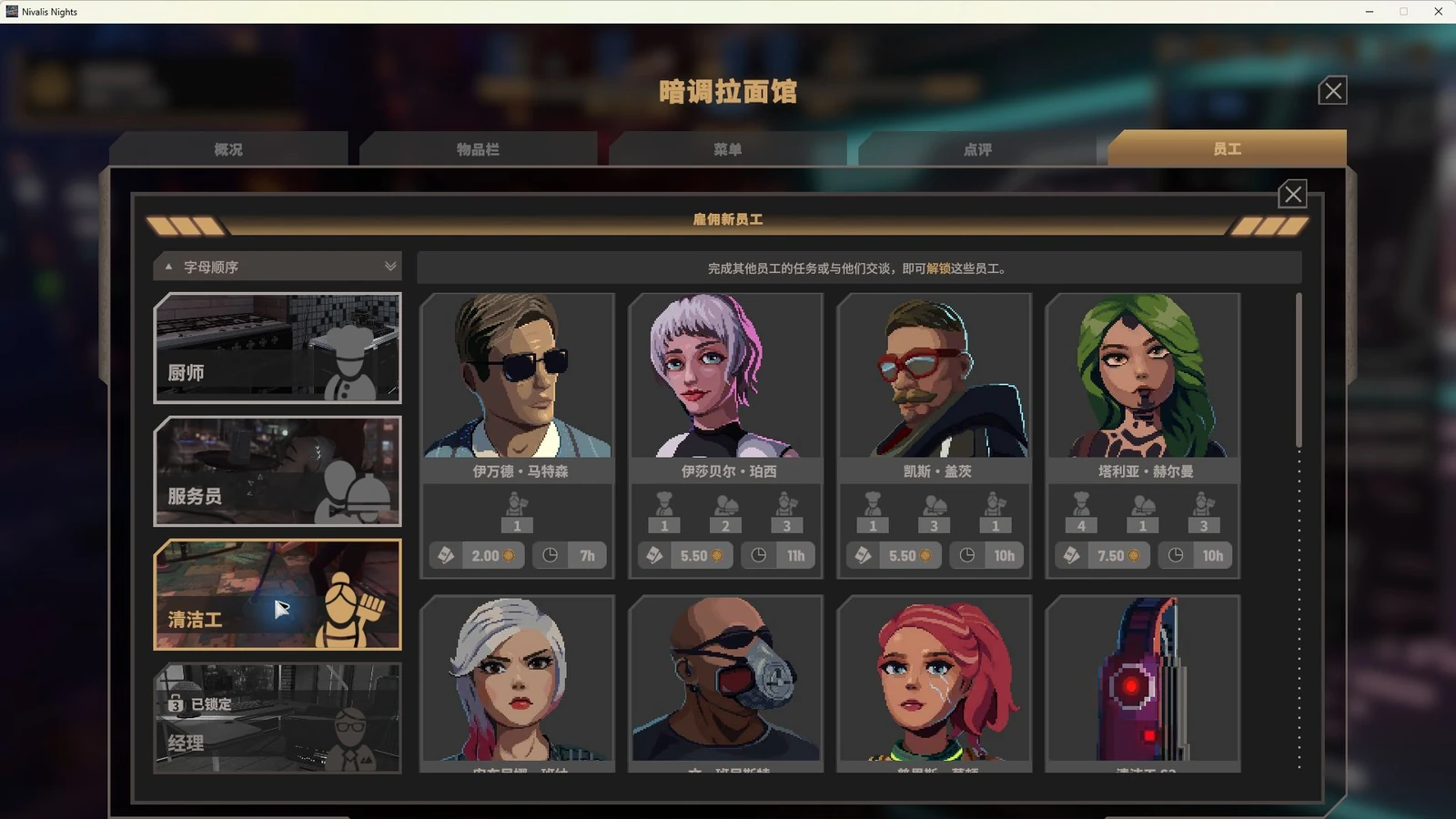
Press I, choose the Businesses icon at the far right of the top row, then select Ramen Noir. Its Overview shows cleanliness, meal progress and staff capacity; its Employees tab lists each actual employee, hourly pay and shift.
Count the employee rows rather than adding up the chef, server and cleaner icons. Our Day 13 Overview showed one chef, one server and one cleaner role, but only two employees: Banor and the hired cleaner. Banor had both cooking and serving roles. The venue was level 1 with its two staff slots filled.
Use the hiring board and verify the result immediately
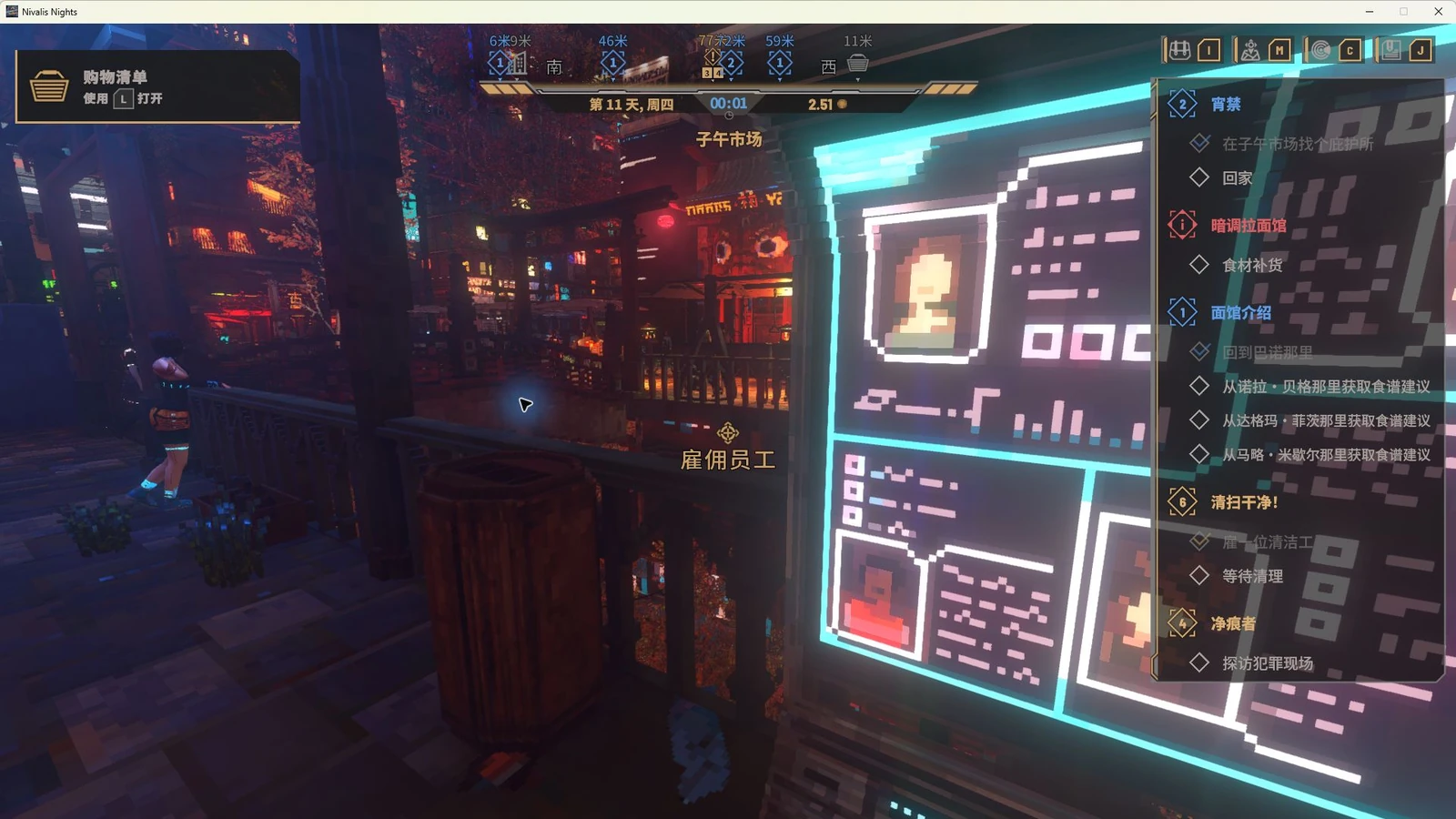
- Check the cleaner objective in the quest log. We found the illuminated hiring board beside the canal and a tree near the restaurant.
- Interact with the board and select Ramen Noir. Open Employees, select an empty Hire slot, then filter the candidates to cleaners.
- Inspect the candidate’s role, hourly wage and stated shift duration before selecting the card. Clicking the candidate card hired the cleaner immediately in this test; no separate confirmation appeared.
- Return to the Employees screen and check that the new person is listed and that the staff counter has increased.
- Follow the remaining cleaning objective and inspect the venue again. Hiring alone did not complete the waiting step in our run.
The candidate card displayed a cleaning skill of 1, pay of 2.00 per hour and a seven-hour shift. After hiring, the Employees screen showed the 08:00–15:00 schedule. The staff counter became 2/2. The next day, the cleaning task completed and the cleaner’s skill increased; the Day 13 Employees screen showed skill 2, and Overview showed 94% cleanliness. These values describe this candidate and save, not a guaranteed hiring cost or completion time.
Check the recipe book after the NPC conversations
The restaurant introduction sent us to Nora, Dagmar and Malo. Our observed Nora dialogue branch followed this order: introduce the noodle shop, ask for cooking advice, ask how to ask, thank her, ask whether she will help, then select the translated choice “We’re all in the same boat.” A Beer recipe notification then appeared and Nora’s objective became complete. We have not tested other dialogue branches or proved that this is the only successful route.
By the end of Day 12, Beer and Espresso Martini were unlocked. Open I, choose Recipes, then Drinks to inspect their requirements. The following defaults remained visible after loading our new Day 13 manual save.
| Unlocked recipe | Default ingredients shown | Equipment shown |
|---|---|---|
| Beer | Wheat | Drinks machine |
| Espresso Martini | Coffee beans, coffee liqueur, vodka and sugar | Drinks machine |
The Day 12 end-of-day report listed Espresso Martini as unlocked, and the reloaded recipe book confirmed its requirements. The exact granting dialogue was not captured, so we do not identify a guaranteed NPC dialogue solution. We have not made either drink, added it to the restaurant menu or measured its sales.
Our fresh stock at this checkpoint was only two noodle units, alongside two separate spoiled-food entries. The restocking objective remained active. Recipe discovery did not itself replenish the venue or restore our cash.
What you can plan now
- Write down startup spending separately from recurring costs.
- Compare revenue and expenses over the same in-game period.
- Use net profit to estimate how long startup spending takes to recover.
- Recheck your figures after upgrades or changes to your business.
Fishing for ingredients and market sales
The official FAQ connects fishing with restaurant ingredient supply and keeping fridges and freezers stocked. You can also sell your catches on the market.
Greenhouses and harvested produce
Greenhouses let you plant and harvest produce, then use it in your restaurants or sell it on the market. The same FAQ says you can adjust Greenhouse settings to suit the growing conditions for your produce.
Source: Official FAQ, last edited September 29, 2026; checked October 2, 2026.
Update 7: managers, drinks and venue costs
The official October 29 Update 7 announcement, published October 29, 2026 at 16:18 UTC, assigns ingredient delivery runs to managers. Other staff take over only when no manager is on shift, and manager hiring requires the venue's manager unlock. Greenhouse-first sourcing from Update 6 remains a separate rule; this update changes who makes the run.
Manual cup cleanup is now reported shipped. Players can clear cups left in drink machines; abandoned unfinished orders no longer remain stuck, and emptied cups no longer return and overlap later drinks. This supersedes the dated Update 6 manual-cleanup warning below. The wiki has not retested these actions.
For older saves, the publisher corrects inflated greenhouse ingredient costs in venue finances. Update 6's earlier description concerned growing-cost calculations for new sales; keep that dated context when comparing older ledgers. These notes do not provide a new profit table or establish that every historical transaction is recalculated.
Approach kitchen appliances from the front: rear-side use that moved the player through counters is closed. Table menus and umbrellas can share a table, and objects no longer fall through high tables. Rival restaurants also reopen on schedule after loading; their signs follow changes in opening hours. The full venue notes include hiring, furniture, litter, fridge and interface repairs.
Update 6: before sleeping, restocking or comparing costs
The official October 22 Update 6 announcement changes what happens when you go to bed before curfew: the venue’s remaining evening is simulated, including service, customer payments, reviews and staff wages. When comparing days in your own save, include the wage cost as well as the extra service; the notes do not establish a most-profitable bedtime. Our earlier restaurant screenshots and ledgers are historical observations, not an Update 6 overnight test.
For new sales, venue accounts use your own greenhouse produce’s growing cost, not its market price. Pre-patch sales retain their old estimate. Compare records from the same period before treating a cost difference as a change in operational efficiency. Manager notices now identify greenhouse, vendor or mixed supplies: greenhouse ingredients are used first and vendors fill only the remainder.
Auto-plant restores the same crop after an automatic harvest even with full greenhouse storage. Modules locked by Update #5’s Farming-level rebalance are refunded at their base price, with a notification showing how many and how much; any growing crop returns its seed. Upgrade prices are shown across greenhouses again. These changes do not supply a new yield table or guarantee profitable farming.
After loading a save, fridges now retain their refrigeration behavior. Beer Soup in older saves uses cooked Wheat rather than Beer; recipe corrections preserve existing customizations. Squid Ink no longer spoils or needs a fridge, and the older-save hidden/Rotten Food problem is reported corrected for A Drink to the Past. Earlier food and recipe observations below keep their original dates.
During a rush, you may collect a finished meal claimed by a waiter who has not yet picked it up. Drink pickup works again, but cleaning drinks yourself was an unresolved Update 6 issue; staff could clean them at that time. Update 7 now reports player cup cleanup as shipped. These are publisher reports, not actions retested in this wiki’s saved game. See the dated Update 6 known-issue notice.
October 16 small patch: customer timing and crop markers
The official October 16 small-patch announcement says NPC hunger now returns every 6 in-game hours, correcting an unusually slow recovery. The timing problem also affected sleeping behavior. The publisher expects a large morning rush when nearly everyone is hungry; the notes provide no customer-count forecast, staffing ratio or guaranteed revenue increase. Our earlier restaurant sales observations were recorded before this patch.
The unhappy-smiley/no-review display after eating receives an entirely visual correction, rather than a new rating or review rule. For greenhouse work, the most recently planted crop is now marked in the module list and the module’s radial menu. These are publisher-reported changes; this wiki has not tested the new customer timing or crop markers.
Update #5: greenhouse automation and venue stock
The official October 15 Update #5 announcement makes the Automatic Harvester available at Farming level 15, followed by the RePlanter 4000 at the new level 16. Replanting follows harvesting. Open the greenhouse selection panel through Tab to inspect modules, use the console remotely, choose crops and toggle automated harvesting or planting.
Furniture with a storage value supplies basic or refrigerated greenhouse capacity. Harvests go into that storage, overflow into the other storage type when necessary, then fall back to your main inventory with a warning if both are full. Enable Use Greenhouse Stock separately in each venue’s management settings so managers use your crops before buying ingredients. The budget display also shows spending already used.
Before relying on old unlocks: the Farming rebalance can lower levels in an existing save, temporarily putting owned modules or new upgrades above your current level requirement. Growth times, yields and levelling requirements changed, but the announcement provides no replacement numeric table. These are publisher reports, not a post-update farming or profit test.
Update #5: understand your venue ranking
Venue income now uses the last 7 days for players and NPCs alike. Tier, popularity and income count equally, with earnings compared against the city’s strongest earners. Extra venues still help, but each adds less than its predecessor; story-event owner reputation counts more. Check each venue’s displayed ranking-point contribution instead of treating revenue alone as its rank.
The complete formula is unpublished. Corrected popularity for smaller rivals may reduce your customer activity. Earlier first-hand sales examples on this page remain dated observations, not a benchmark of Update #5.
Update #4: control manager restocking
The official October 9 Update #4 announcement adds Venue Management Settings in the venue overview. Choose a supply target, set that venue’s daily restocking budget, and enable or disable HUD restocking notifications. Check the shopping list to see which quantities the manager will buy.
| Supply target | Required ingredients |
|---|---|
| Lean | 2 of each |
| Normal (default) | 5 of each |
| Extra | 10 of each |
| Recent Sales | Meals sold during the previous 4 in-game hours; minimum 2 |
The automatic reminder now starts at 0 stock for a required ingredient. If it keeps returning, check whether vendors sell the menu’s ingredients and whether the budget covers them. Existing deliveries transfer to available venue storage; overflow enters your main inventory.
Expand red recipe warnings for missing ingredients or processors. Menu-use indicators in storage help identify surplus ingredients. The patch returns reserved ingredients to storage when a guest leaves before preparation finishes and fixes venue cost calculations. These are official changes, not a tested profit guarantee.
Update #4 known issue: settings display after loading
Historical report from October 9, 2026: Venue Management Settings could appear changed after loading a save. The publisher said the actual venue parameters remain saved and that a prepared fix was not included in Update #4.
October 15 follow-up: Update #5 reports that the Restock Notifications toggle now displays the saved value correctly after loading. That specific correction does not establish that every venue-settings display problem is fixed. See the official October 15 Update #5 announcement.
Version context: the dated first-hand examples above were recorded before Update #4. Its changes to costs, ingredient handling and cleaner performance mean those examples are historical observations, not post-update benchmarks.
Manager restocking in Update #3
Historical rule: Update #4 replaces the below-10 reminder threshold described here with a zero-stock trigger. Use the newer settings above.
The October 5 Update #3 announcement says the red automated Restock Ingredients objective appears when an ingredient’s stock falls below 10. Manager restock quantities now align with that objective and account for queued deliveries of the same ingredient. This does not establish an ideal storage target or prove every restocking problem is solved.
Manager experience and delivery timing
Hired managers gain skill experience for attempting to resolve customer complaints, with an additional bonus for a positive outcome, placing ingredient orders and delivering ordered items to venue storage. The publisher reports 10 seconds down to 4 seconds at maximum manager level between placing an order and its delivery becoming available. This is availability after ordering, not a measured time for a manager to carry goods to storage.
The venue-storage restock notification now appears after delivery. For NPC-run venues struggling later in the game, the notes describe improved delivery scheduling, missing rotten-food bins on Calypso Island and allowing all roles to perform ingredient deliveries. They do not provide a replacement priority list for every player-owned venue.
Storage cleanup and staff positions
Update #3 fixes rotten-food cleanup when larger quantities exist in both normal and refrigerated venue storage, and updates staff positions in all player-ownable venues. The October 2 stuck-staff suggestion below remains a dated report; the new notes do not explicitly declare every stuck-staff case resolved.
Industrial District greenhouses
Update #3 adds three greenhouses in the Industrial District. It also fixes visual issues with greenhouses at the Docks. No purchase prices, yield measurements or tested route are given in the announcement.
Staff and skill changes in Patch 01.10
The October 1 official patch revises staff order handling, addresses one case of repeated ordering actions during ingredient replenishment, improves manager behavior when purchasing ingredients, and fixes business and barter skill progression.
These are specific publisher-reported changes. They do not establish that every manager or automatic-restocking issue is solved, or validate a player mod or guaranteed-profit strategy. Read the full patch summary and remaining issue before applying advice from an earlier game version.
Staff priorities in Update #2
The October 2 official update gives staff this task order:
- Serve a meal
- Process an ingredient
- Make a meal at a Food Processor or Drink Machine
- Take a new order
- Deliver ingredients — Manager role
- Buy ingredients — Manager role
- Manage a complaint — Manager role
- Clean up a meal
- Clean up trash — Cleaner role
- Clean up storage — Cleaner role
This is the priority list published October 2, before Update #3. The later notes change manager restocking and NPC-run ingredient deliveries without supplying a new complete priority order. The publisher says this encourages specialization. A venue with only one staff member will likely leave many customers unserved if there are too many seats. This does not establish an optimal staff-to-seat ratio.
Ingredient age and storage
Update #2 reports that meal preparation uses older ingredients first. The publisher says this reduces rotten food, but may also reduce the food-freshness aspect of customer reviews; it does not promise a guaranteed profit increase.
Decorative furniture with a configured normal or refrigerated storage value now counts toward venue capacity. The Kitchen Buffet provides 100 normal storage space and 50 refrigerated storage space. Corrected trash-bin positions in Central Canyon are intended to improve manager and cleaner behavior there.
Staff getting stuck
The same update lists staff getting stuck as a known issue. The publisher suspects a connection to idle positions and suggests trying fewer hired staff at a venue. This is a temporary suggestion with a suspected cause, not a confirmed fix or a universal staffing recommendation. See the dated issue notes.
Spoiled food and composting
A developer reply on Steam says spoiled food can be kept for composting. CalmDownTom posted the reply on in a discussion about disposing of spoiled food.
The October 5 Update #3 notes report fixes for composter and vending-machine item duplication, as well as minor optimizations. No duplication method or guaranteed recovery of previously duplicated items is established here.
Curfew activities and business risks
The official Steam listing describes avoiding security systems while sabotaging competing businesses during curfew. It warns that similar actions can also affect you.
The official Steam achievement list describes Rat Whisperer as helping Gladstone with a secret mission during curfew. These listings identify activities; they do not establish curfew timings, controls, penalties or a tested route.
Sources checked October 4, 2026. These are existing official features, not a new patch announcement.
Before opening another venue
Check whether your existing venue is profitable and whether you have enough cash to cover its expenses. This is general budgeting advice, not a claim about a hidden game mechanic.
What is not established here
We have not gameplay-tested optimal menus, staff assignments or upgrade order. This page does not promise a best restaurant or a guaranteed money-making exploit.
Plan your next venue →