START HERE
Beginner’s guide
On this page
Nivalis Nights combines business management with everyday life in a cyberpunk city. This page separates first-hand observations and tested save-menu steps from planning advice for your first session.
Early debt and curfew dialogue: observed in-game
In a first-hand session on October 7, 2026 (UTC), using Steam build 25738165 and the Simplified Chinese interface, we recorded the early debt and curfew dialogue. The NPC said that taking over the noodle bar also brings its debt, and described allocating 5%, 10% or 15% of the day’s earnings toward interest. These are the options described in the dialogue, not verified interest rates or a tested repayment strategy.
In our observed sequence, the quest list then showed Curfew with a Go to bed objective alongside the existing taxi objective. These labels are our translations of the Chinese interface. Read the full dialogue and check your current objective list before continuing.
We have not tested a debt payment, completing the sleep objective, curfew penalties, nighttime safety or the taxi route. See our observation method and scope.
Your first evening in the city
- Follow the game’s opening instructions before making large purchases.
- Learn how to save, navigate and interact. Steam lists full controller support; the save-system details are below.
- Record the costs and income of your first business before expanding.
- Keep a reserve for expenses instead of spending your whole balance on decoration.
- Explore at your own pace: the official description includes fishing, apartment decoration and relationships alongside work.
Why the opening can feel overwhelming
In a PC Gamer interview published October 10, 2026, Nivalis Nights lead writer Thomas Welsh said the busy opening and its sense of urgent demands were deliberate. He also said players can complete the story despite poor business performance. This is his explanation of the game’s design. We have not tested story completion with a struggling business; the interview supplies no funding thresholds, quest order or deadline rules. For a less crowded display, see the official Quest Marker Filtering option from Update #4.
Relationships and romance
In a PC Gamer interview published October 9, 2026, lead writer Thomas Welsh described uncertain romance outcomes as intentional. He said the team wanted missed romantic opportunities to prompt reflection, instead of treating a few friendly replies as a guaranteed reward of intimacy.
Autosaves and manual saves
The official FAQ says autosaves happen at the end of each day. You can make a manual save from the Pause Menu during gameplay. The publisher recommends saving manually before quitting to keep progress since the last autosave.
Manual save and load: tested in the opening scene
On October 7, 2026 (UTC), in Steam build 25738165 with the Simplified Chinese interface, we created a new manual save in an empty slot and loaded the same entry twice during one running session. This is a tested menu sequence; the English menu names below are translations.
- During gameplay, open the Pause Menu. When Save is available, select it. The in-game menu has both Save and Load; the title screen is a different menu.
- Select an Empty slot to create a new save. In our first test, clicking that slot returned directly to the Pause Menu.
- Open Load and check that a new entry appears. Ours showed Day 1, Lower City, a scene thumbnail, playtime 00:10 and a date/time stamp. That stamp is not evidence of the saved in-game clock.
- Select the entry to load it. Both tests showed a loading screen followed by the opening scene. The HUD showed Day 1, a balance of 1,000, Lower City and the still-active taxi objective with a 47 m marker.
After the first load, we observed the displayed clock reach 13:03. The first completed-scene capture after the second load showed 12:24, earlier than that observation. This verifies an observed displayed-clock rollback in this session. We did not capture the exact clock at saving or immediately before the second load, so these values do not establish the precise saved time or exact amount of rollback.
Before the second load, Save was greyed out and labelled Currently unavailable, while Load remained selectable. We have not established why Save was unavailable or when it becomes available again.
When checking your own save, compare its day, location and thumbnail before loading. The selected empty slot showed placeholder details; those values were not the current character balance.
This test does not establish recovery of changed quest progress, persistence after restarting the game, Steam Cloud synchronization, autosave timing or the overwrite fix. We have not completed the taxi objective. See the test scope and retained evidence.
Saving later quest progress: tested on Days 11–13
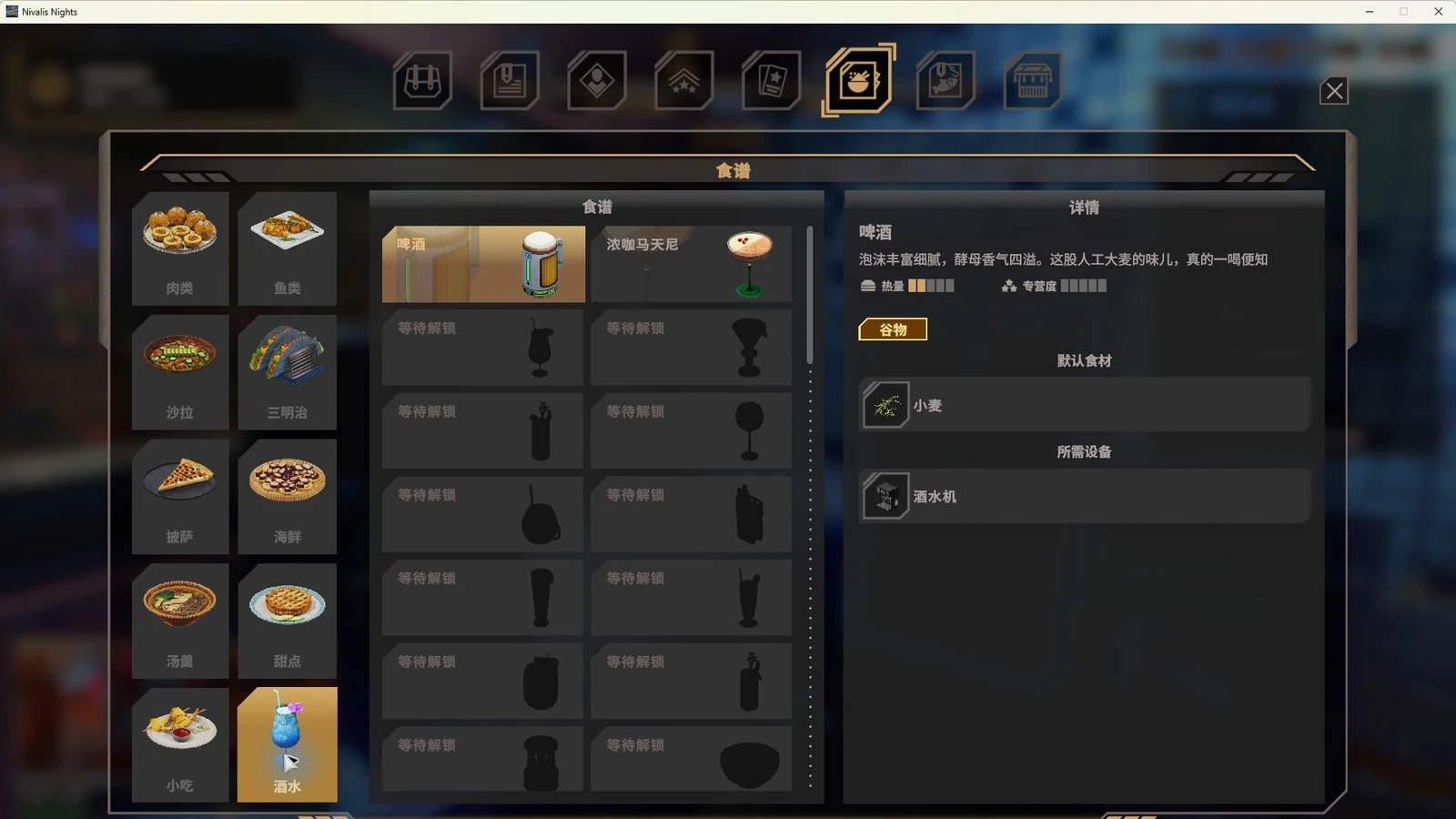
In the October 8, 2026 UTC follow-up test, we created separate manual saves in empty slots on Days 11, 12 and 13. We then loaded those new entries during the same running session. Later quest progress returned, and Beer and Espresso Martini remained unlocked after the Day 13 load. The cleaner and recipe walkthrough describes that stage.
- Open the Pause Menu, choose Save and select an empty slot to keep earlier checkpoints.
- Open Load and check the new entry’s day, district, timestamp and thumbnail before selecting it.
- After loading finishes, check the quest objectives and recipe book against the progress you intended to save.
This verifies these same-session loads in one save. It does not establish exact saved-clock restoration, later-game reliability, overwriting, Steam Cloud or recovery after restarting the game. Source: Days 11–13 test scope.
Your first restaurant supply run
Buying ingredients and stocking a venue are separate steps. Our tested Ramen Noir supply steps cover the shopping list, purchased ingredients and restaurant-storage transfer, followed by the first day of sales. The recorded run still had Return to Banor pending.
Overwriting an existing save
The October 2 Update #2 announcement reports that the previous save is no longer lost if an unexpected crash occurs while overwriting it. This is a specific overwrite fix; it does not promise recovery from every kind of save loss.
Cloud saves and offline play
The official FAQ describes automatic save synchronization between PCs through Steam Cloud. Synchronization needs an internet connection; offline play remains available, and saves synchronize when you reconnect. The FAQ also notes that platform updates may require a connection.
Ramen Noir decorations and plants
The October 1 Patch 01.10 notes add detail to this quest objective and identify home-furniture shops in Eastern Residential, Hive Mall and Central Canyon as places selling decorations and plants. The notes do not specify prices or an optimal shopping order.
Quest log text after hiding it
The same announcement describes a remaining problem: after holding J to hide the quest log, its text may be hard to read when shown again. The publisher suggests reloading your save if this happens. Its internal fix was not included in Patch 01.10. This is the October 1 report; Update #2 does not mention a quest-log text fix, so we do not treat the issue as confirmed resolved. Update #3 also does not announce that specific fix. See the patch notes and the save instructions above.
Update 7: calls, saves, curfew and controls
The official October 29 Update 7 announcement, published October 29, 2026 at 16:18 UTC, reports a story-choice repair for saving, loading or sleeping while a phone call is waiting. Missed calls return while they remain relevant to the story, and conversations wait for the loading screen to finish. In Green Thumb, the grown King Mushrooms and Beef enter your inventory for the return to Ma Gomba. Loading saves/autosaves also receives a falling-under-the-map repair, including affected saves made before the patch. These are publisher reports, with no new save or quest playtest here.
During curfew, a location's security now drops one level every two incident-free days; another capture at level 5 leaves it at level 5. A rival venue goes without stolen furniture for three days. These dated official rules replace relying on the older abrupt 5-to-1 drop; the notes do not supply every security threshold or a tested theft route.
In placement mode, the first right click puts away the held item and a second closes the mode. Controller fixes include journal quest pinning, including on Steam Deck, and D-pad menu navigation. Quest pinning is a specific repair, not evidence for a Steam Deck Verified or Playable label. Other control, story and world repairs are in the Update 7 notes; earlier keyboard/gamepad and save observations remain historical.
Update 6: quests, saves and controls
The official October 22 Update 6 announcement reports fixes for Ava and Aseptic blockers, a Network condition mismatch, and falling through the world at Pilk’s Lowtown apartment in Slumlord. It also corrects curfew capture trapping the player, floating above a boat after loading a boat save, and an autosave sometimes starting with a downward-facing camera. These are specific reported fixes, not a tested quest route or a promise to repair every older save.
On a gamepad, LB/RB changes shop/placement categories and cupboard/fridge storage views; the right stick scrolls lists. B returns from item details to the selected list item; while holding an item in placement mode, B puts it away and returns focus to the list. Other connected devices such as steering wheels should no longer take over input. A visible search field should accept typing directly, and the Characters menu can find vendors by item while retaining its Chat/Quest tab when switching characters.
At Update 6 release, the publisher listed untranslated new text and incomplete manual drink cleanup. Update 7 now reports that players can clean cups themselves; its text changes do not explicitly close the translation issue. Going to bed before curfew now includes evening venue service and staff wages, so read the overnight accounting context. Earlier dated save-menu tests below were not repeated on Update 6 and do not become current tests merely because a patch was released.
October 16 small patch: quest and dialogue fixes
The official October 16 small-patch announcement reports a conditional softlock fix for Ava’s quest involving R.M.Alken and Dr Matombo, plus a fix for the player becoming stuck after some dialogues. These are publisher reports; we have not tested the fixes. The announcement supplies no quest route, recovery steps or game build number. See the complete eight-change summary.
Update #5: save changes and quicker travel
The official October 15 Update #5 announcement reports a warning popup when saving fails and a fix for missing autosaves after story-triggered sleep. Existing saves convert automatically to a smaller review history: owned venues keep the last month’s review details, and other venues keep their newest reviews. Lifetime statistics and achievement progress still include historical reviews, although lifetime review browsing is removed. The publisher observed a 50% late-game size reduction; individual results can differ.
New fast-travel choices lead to owned venues and greenhouses where present in the district; owned greenhouses also appear on the map. These are official changes rather than a route tested by this wiki. Keep the dated manual-save instructions above in mind, and read any save-failure warning before assuming progress was stored. See the reported quest fixes if an older save is blocked.
Update #4: autosave retention and quest markers
The official October 9 Update #4 announcement says up to 7 autosaves are retained; another autosave replaces the oldest once that limit is reached. This retention limit does not establish a manual-save limit or prove recovery from every save problem. Continue making a manual save before quitting, as the FAQ recommends.
Enable Quest Marker Filtering in gameplay settings to show only journal-pinned quests on the HUD, compass, map and in-world markers. Venue setup reminders still appear.
Banor’s next shift in an existing save
The October 5 Update #3 notes explain that Banor’s pre-patch eating schedule may still overlap his work schedule in an existing save. The publisher warns that his next arrival can be late, then expects later arrivals to be on time. We have not tested that transition in a save.
District achievement unlocks
Update #3 rebalances achievement-point unlock requirements for all districts. The announcement gives no new point thresholds. Check the game’s achievements window for activities that earn points; older numerical unlock tables may need checking against your current game.
Choose a small goal
For your first session, aim to understand one venue and one neighbourhood. Use the planner to compare income with expenses using numbers from your own save.
Open the business planner →